

Get to Know Your Apple Wallet
June 3, 2026
Mistakes with Unwanted Email
June 16, 2026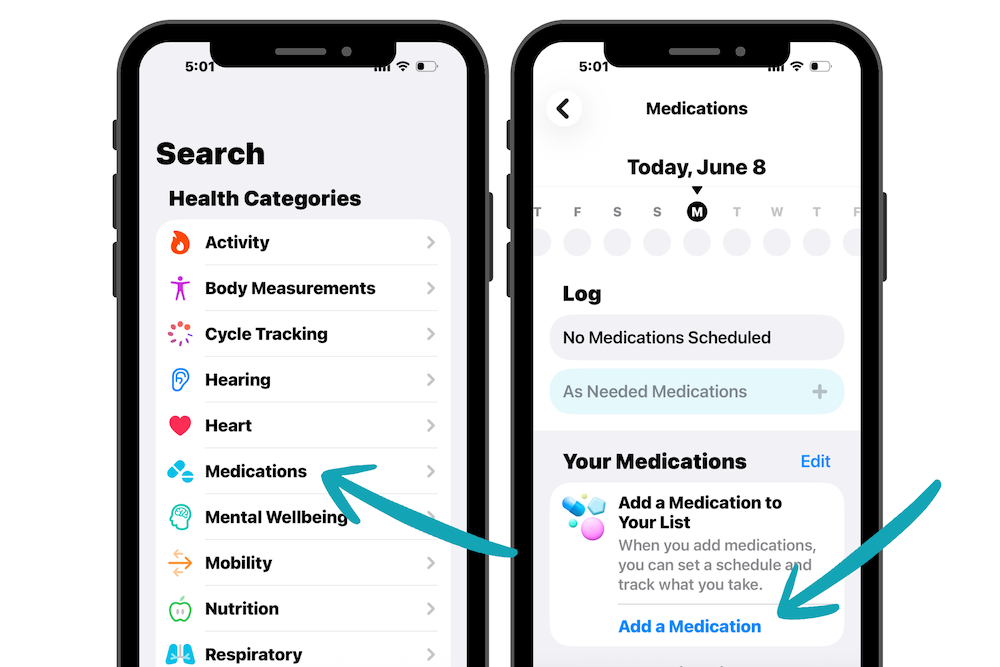
Keeping track of medications can be challenging, especially when managing multiple prescriptions or supplements. The Medications feature on your iPhone can help you stay on schedule.
Adding Medications
Open the Health app and tap Search > Medications > Add a Medication. Enter your medication name, then follow the prompts to add details such as dosage, schedule, and duration.
You can even use your iPhone camera to scan medication labels and add them automatically. And you can customize each medication with a color and shape, making it easier to identify at a glance.
Logging Medications
When it’s time to take a medication, open the Health app and tap Taken or Skipped. If you have an Apple Watch, you can also log medications directly from the Medications app on your watch.
Set Medication Reminders
One of the most helpful features is medication reminders. Turn on Dose Reminders in the Health app and your iPhone, iPad, or Apple Watch will notify you when it’s time to take your medication.