

Use Your iPhone to Track Medications
June 16, 2026
Search on Your iPhone/iPad Is a Powerful Tool
June 29, 2026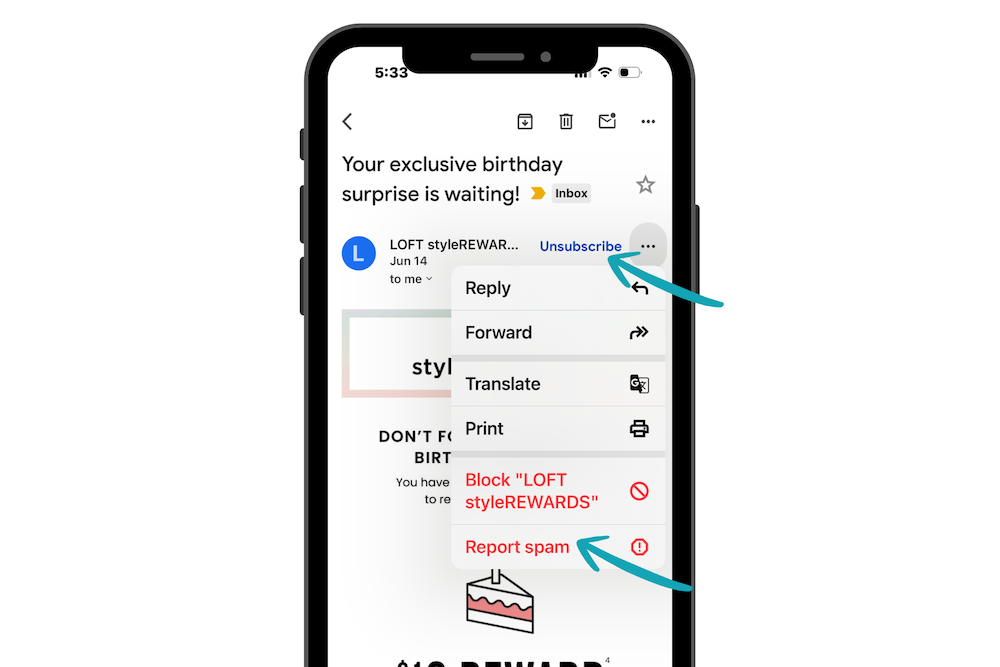
If your inbox feels more crowded than your closet, you’re not alone. One of the most common questions I hear is: “Should I unsubscribe or mark it as spam?” While both can reduce unwanted email, they serve different purposes.
Use Unsubscribe for Legitimate Emails
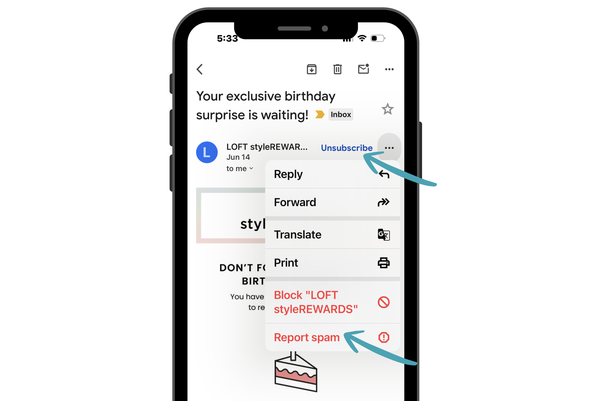
If you recognize the sender and have once agreed to receive their emails, the Unsubscribe link is usually the best option.
Examples:
- Stores where you’ve shopped
- Newsletters you signed up for
- Charities or organizations you support
- Businesses you have worked with
Clicking Unsubscribe tells the sender you no longer want their marketing emails.
Use Spam or Junk for Unwanted or Suspicious Emails
If you don’t recognize the sender, didn’t ask for the email, or the message seems suspicious, choose Report Spam or Move to Junk instead.
Examples:
- Strange offers
- Unexpected prize notifications
- Unknown companies
- Emails that look like scams
Reporting spam helps your email provider learn what you don’t want and may reduce similar messages in the future.
One Important Tip
For the best results, use your email provider’s app to mark messages as spam.
For example:
- Gmail users should use the Gmail app or the Gmail website.
- Outlook users should use the Outlook app or Outlook on the web.
- Yahoo users should use the Yahoo Mail app or the Yahoo Mail website.
This allows the email provider to improve its filtering and better protect your inbox.
A Quick Rule of Thumb
I know the sender, but don’t want the emails anymore.
→ Unsubscribe
I don’t know the sender, and the email looks suspicious.
→ Mark as Spam or Junk
A cleaner inbox means less clutter, fewer distractions, and less chance of missing the emails that actually matter.