

Setting Up Apple Watch Passcode
April 24, 2026
Water Lock on your Apple Watch
April 29, 2026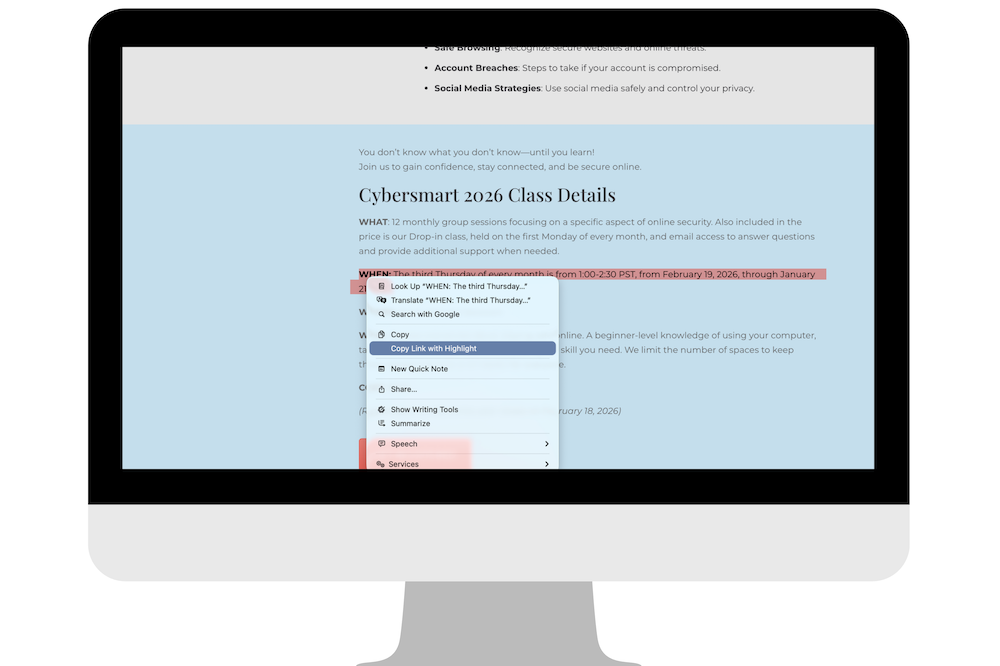
Sometimes when you send someone a link, you don’t actually want them to read the whole article, but you just want them to see one specific sentence. Luckily this is an easy thing to do in your browser.
Google first introduced this feature in Chrome with something called Scroll to Text Fragment, which lets a link jump directly to highlighted text on a webpage. Now Apple has added full support in Safari 18, available on macOS Sequoia and later.
How to use Scroll to Text Fragment
- Open the webpage.
- Highlight the exact sentence or passage you want to share.
- Right-click (or Control-click) the highlighted text.
- Choose Copy Link with Highlight.
- Safari creates a special link that includes extra code (you’ll notice a # in the URL). When someone clicks that link, it takes them straight to that section of the page and highlights it automatically.
It’s a small feature, but incredibly useful. Whether you’re referencing research, sending instructions, or proving a point, you can now guide someone directly to the exact words that matter.