

Sharing a Webpage with Context
April 24, 2026
Be Aware of the CAPTCHA Scam
May 5, 2026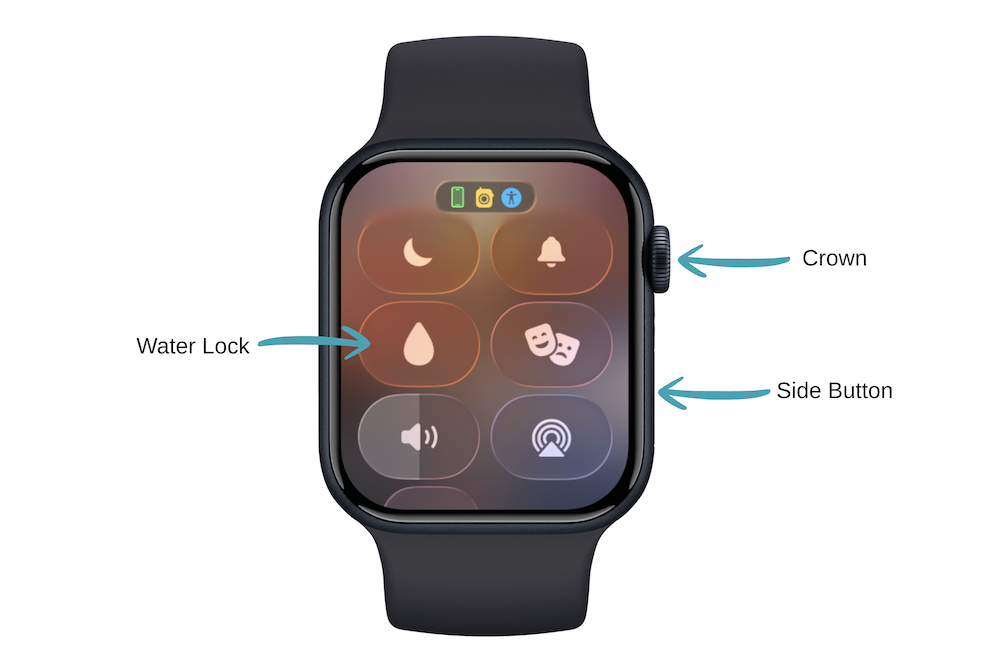
A client reached out after her watch suddenly stopped responding when she accidentally set off the emergency alert and couldn’t turn it off. The cause wasn’t a glitch. It was a setting that had quietly stayed on for hours after a swim.
On an Apple Watch, Water Lock is designed to protect your screen from accidental taps when it’s wet. When it’s on, the display won’t respond to touch so water droplets don’t trigger buttons or apps while you’re swimming or showering.
Turning it on is simple
Swipe up to open Control Center and tap the water drop icon.
Turning it off is where people get stuck
You need to press and hold the Digital Crown until you hear a series of beeps. That sound means the watch is ejecting water from the speaker and unlocking the screen.
Here’s the problem: If Water Lock is still on, you cannot interact with your watch in a moment that matters. Notifications for new messages or phone calls will appear, or features like fall detection or emergency alerts may activate, but responding quickly becomes impossible because the screen is locked.
Make it a habit to turn off Water Lock as soon as you’re out of the water.