


Be Aware of the CAPTCHA Scam
May 5, 2026
Siri for Accessibility and Safety
June 3, 2026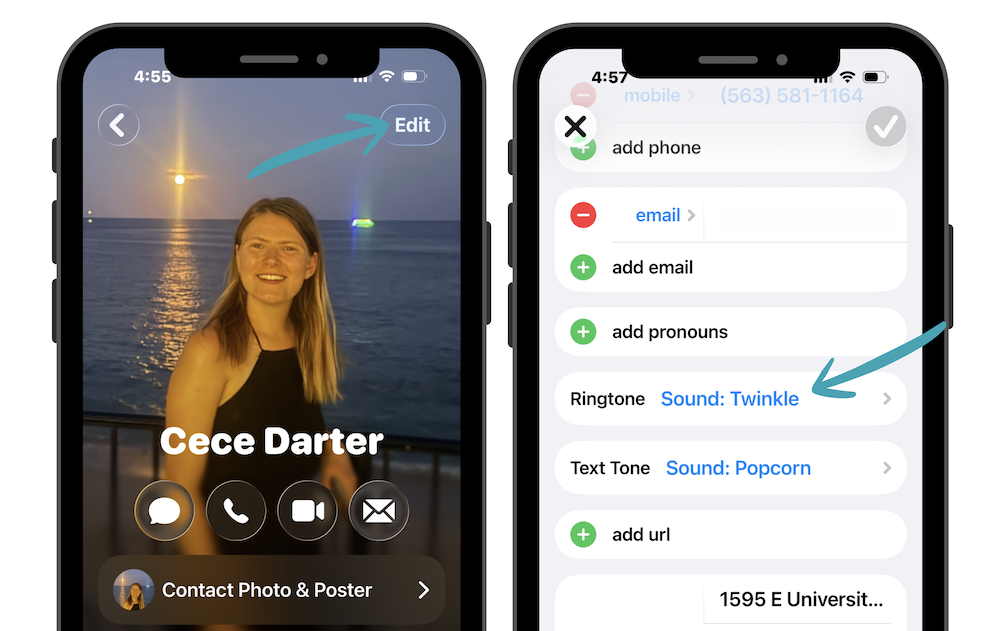
Did you know you can set custom ringtones and vibration patterns for specific people on your iPhone? It’s a simple feature that can make a big difference in helping you stay connected without constantly checking your phone.
Customizing Alerts
- Open the Contacts app
- Select the person you want to customize
- Tap Edit in the top-right corner
- Tap Ringtone or Text Tone
- Choose a unique sound, vibration, or alert tone for that contact
You can repeat this process for as many contacts as you’d like. Many people set different tones for a spouse, children, close friends, or important work contacts so they instantly know who’s reaching out without even looking at the screen.
This can be especially helpful when you’re working, staying focused, or simply trying to spend less time on your phone while still making sure you don’t miss important calls or messages.